
Step-by-step wizard UI
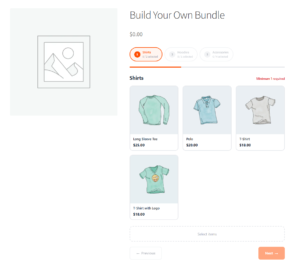
The bundle builder replaces the standard WooCommerce add-to-cart form on bundle product pages with an interactive React-powered wizard. The wizard loads asynchronously — a loading skeleton is shown while the bundle data is fetched from the REST API.
The wizard includes:
- A progress indicator (configurable style: pills, numbered circles, or bar)
- Step item counter per step (“2 / 3 items selected”)
- Product cards with image, name, price, and selection state
- Next/previous navigation between steps
- A sticky price summary with real-time price updates and savings badge
Pricing modes
Sum of items — The displayed price updates in real time as the customer adds or removes products. Each product’s current WooCommerce price is used.
Fixed price — A single price is shown regardless of product selection. Customers see the fixed price from the moment they open the builder.
Tiered discounts — The price summary updates dynamically as selections are made. When a tier threshold is approaching, a hint such as “Add 2 more items to unlock 10% off” is displayed to encourage customers to reach the next tier.
Real-time stock checking
The builder polls the REST API every 30 seconds to check stock availability. Products that go out of stock while a customer is building their bundle are automatically flagged with an out-of-stock overlay. Customers cannot add an out-of-stock product to their selection.
Cart behavior
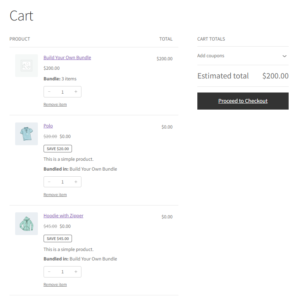
Bundles are added to the WooCommerce cart as a parent item (the bundle product at the calculated bundle price) plus individual child items (each selected product at $0). This structure ensures:
- Individual product stock is accurately deducted on checkout
- The cart displays a meaningful bundle summary
- Removing the parent bundle automatically removes all its children
- If the parent is restored via “undo remove”, child items are restored too
- Child item quantities are locked — they cannot be changed individually in the cart
- Child items do not have their own remove links
The cart item count reflects bundles as single items (not parent + N children).
Order display
In the WooCommerce order admin, bundle items are visually grouped with:
- A “Bundle” badge on the parent item
- The pricing mode and any discount amount shown below the parent
- A bulleted list of bundled items with quantities
- Child items indented with a “Bundled in: [Bundle Name]” indicator
- Internal meta keys hidden from the raw meta display
Email integration
Customer order emails include a bundled items summary below the parent item in the order table. The child item rows and the summary are independently controllable via the Orders & Emails settings (see Section 5.3).
WooCommerce Blocks compatibility
The plugin extends the WooCommerce Store API to include bundle metadata on cart line items. In the block-based Cart and Checkout, bundle items display correctly with bundle badges, “Included” price labels on child items, and locked quantities.
Theme compatibility
The plugin includes a theme compatibility layer that applies targeted CSS corrections for the following themes: Storefront, Astra, GeneratePress, Kadence, OceanWP, and block-based (FSE) themes. A .aop-bb-product-page body class and a .aop-bb-theme-{slug} body class are added on bundle product pages for custom CSS targeting.