
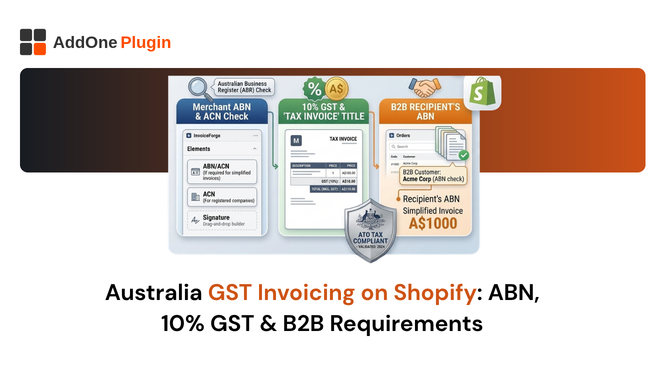
Australia’s GST rules seem straightforward on paper: register once you hit AUD $75,000 in turnover, add 10% to most sales, file quarterly. The problem is the invoicing side. Shopify does not display your Australian Business Number on customer-facing documents. It does not generate ATO-compliant tax invoices natively. And it has no built-in way for B2B buyers to provide their ABN at checkout.
For Australian Shopify merchants, that gap between what the ATO requires and what Shopify provides by default is where compliance breaks down. This guide covers every GST invoicing requirement you need to meet, exactly where Shopify falls short, and how to close that gap permanently.
When Are You Required to Charge GST on Shopify in Australia?
GST registration and charging obligations depend on your turnover, your location, and whether your customers are domestic or international.
The $75,000 Annual Turnover Threshold
You must register for GST with the ATO if your annual turnover to Australian customers is AUD $75,000 or more in any 12 months. The threshold applies to total business turnover, not just your Shopify sales. If you also sell through other channels, those sales count toward the threshold too.
Once registered, you must charge 10% GST on all taxable sales and remit it to the ATO quarterly via a Business Activity Statement (BAS). The ATO has confirmed it uses data-matching with Shopify and other platforms to identify businesses that have exceeded the threshold without registering.
Voluntary GST Registration When It Makes Sense
You can register for GST voluntarily before reaching the $75,000 threshold. This makes sense if you have significant business expenses that include GST, because registration allows you to claim those GST amounts back as input tax credits. For businesses that buy large amounts of stock or equipment, the input tax credits can exceed the administrative cost of GST compliance.
Voluntary registration also means you can provide tax invoices to your B2B customers from the start, which strengthens your professional credibility with wholesale buyers who need input tax credits on their own BAS.
GST on Exports: The 60-Day Rule for GST-Free Sales
If you are GST-registered and export goods internationally, those sales are generally GST-free, provided the goods leave Australia within 60 days of the later of: the date you receive payment, or the date you issue an invoice. If the goods have not left Australia within 60 days, you must charge 10% GST even for international customers.
This rule catches merchants who fulfil from Australian warehouses with slower international shipping. If your fulfilment process regularly takes more than 60 days from payment to export, you need to review your GST treatment on those transactions.
What the ATO Requires on an Australian Tax Invoice
The ATO’s tax invoice requirements differ slightly by transaction value, but all tax invoices share common mandatory elements.
Standard Tax Invoice Fields (Sales Over $82.50)
For any taxable sale over AUD $82.50, you must issue a tax invoice that includes all of the following:
- The words “Tax Invoice” prominently displayed
- Your business name
- Your Australian Business Number (ABN)
- The date the invoice was issued
- A description of the goods or services supplied
- The GST amount payable (or a statement that the price includes GST)
- The total amount payable
For sales over $1,000, you must also include the buyer’s identity or ABN. This is particularly important for B2B transactions where the buyer needs the document to claim their input tax credit.
Simplified Tax Invoices (Sales Under $82.50)
For taxable sales of AUD $82.50 or less, a simplified document is acceptable. It must include your business name, ABN, the date, a description of the goods, and either the total including GST or a statement that GST is included. A basic receipt format is sufficient at this price point.
The practical implication: most B2B sales will exceed $82.50, so you should default to issuing full tax invoices for all B2B orders regardless of value. This eliminates any risk of issuing a simplified invoice to a buyer who needs a full one.
ABN, Business Name, and GST Amount: The Non-Negotiables
Of all the required fields, the ABN is the one that causes the most problems for Shopify merchants. The ATO treats an invoice without an ABN as non-compliant. Your buyer cannot claim the GST credit without it. Shopify does not display your ABN on order confirmation emails or any other standard customer-facing document by default.
This is confirmed in Shopify’s own community forums, where Australian merchants have reported that their ABN and business name simply do not appear anywhere on customer invoices, even after entering them in store settings.
Does Shopify Generate ATO-Compliant GST Invoices?
No. Shopify does not generate ATO-compliant tax invoices for Australian sellers out of the box.
Why Shopify’s Order Confirmation Is Not a Tax Invoice
Shopify’s order confirmation email is a transactional notification, not a tax invoice. It does not use the words “Tax Invoice.” It does not display your ABN. It does not show GST as a separate line item in a clearly labelled format. And it does not include all the fields the ATO requires for a compliant tax invoice.
For B2C customers making small purchases, the order confirmation may be practically sufficient. For any B2B buyer, for any purchase over $82.50, or for any customer who specifically requests a tax invoice, the order confirmation is legally inadequate.
The ABN Problem: Shopify Does Not Display It on Customer Documents
Shopify stores your ABN in your billing settings, but that data is not automatically injected into any customer-facing document template. There is no standard Shopify field that pulls your ABN onto an order confirmation email or into the Order Printer template.
The workarounds that merchants have used, including editing the order confirmation email template in Liquid to manually hard-code the ABN, are fragile. They break when Shopify updates its templates. They do not apply to other documents like packing slips or refund notifications. And they still do not produce a document that meets all ATO tax invoice requirements.
Common Workarounds (and Why They Break Down at Scale)
Some merchants manually generate tax invoices in Xero or MYOB for each order. This creates double-handling, introduces data entry errors, and does not scale past a small order volume. Others use Shopify’s Order Printer app with customised templates, but Order Printer’s template customisation requires Liquid and HTML knowledge, and the ABN display still depends on a non-standard field mapping.
The only reliable solution is a dedicated invoicing app that is built to display ABN numbers, apply GST breakdowns, and issue fully ATO-compliant tax invoices automatically for every order.
B2B GST Invoicing for Australian Wholesale on Shopify
Wholesale B2B selling in Australia adds another layer of complexity that Shopify’s default setup does not address.
Capturing the Buyer’s ABN at Checkout
When selling to other GST-registered businesses, it is best practice (and for sales over $1,000, a requirement) to include the buyer’s ABN on the invoice. But Shopify’s standard checkout does not have an ABN field. Buyers cannot enter their ABN during checkout, and there is no native way to display it on the invoice.
An invoicing app like InvoiceForge adds an ABN capture field to the checkout or order notes process, then pulls that ABN onto the invoice automatically. This is the seamless B2B experience that wholesale buyers in Australia expect.
Displaying Prices Tax-Exclusive for B2B Customers
Most Australian B2B buyers expect to see prices quoted exclusive of GST, because they will reclaim the GST anyway and their purchasing decisions are based on the pre-tax cost. Shopify’s pricing can be configured to show tax-exclusive prices to logged-in wholesale customers using customer groups or tags, but this requires careful setup.
Your invoice must then correctly show both the ex-GST price and the GST amount per line, with the total including GST at the bottom. This is standard format for Australian tax invoices and is what buyers’ accounts payable teams process.
Input Tax Credits: Why Your Invoice Format Matters to Buyers
Your B2B buyer can only claim input tax credits on their BAS if they hold a valid tax invoice from you. If your invoice is missing the ABN, does not say “Tax Invoice,” or does not show the GST amount clearly, the ATO can disallow their credit claim. When that happens, your buyer loses money, and they will hold you responsible.
Professional wholesale relationships in Australia are built on reliable documentation. Merchants who consistently provide clean, compliant tax invoices are the ones wholesale buyers keep returning to.
How InvoiceForge Generates ATO-Compliant Tax Invoices on Shopify
InvoiceForge bridges the gap between what Shopify provides and what the ATO requires, automatically.
Your ABN and Business Name on Every Invoice Automatically
InvoiceForge displays your ABN and legal business name on every invoice, pulled from your account settings. You enter your details once during setup, and they appear on every document generated thereafter. The words “Tax Invoice” are included by default in the Australian template, satisfying the ATO’s display requirement.
Install InvoiceForge free from the Shopify App Store and generate your first ATO-compliant tax invoice in under two minutes.
GST Breakdown With Correct 10% Calculation per Line Item
InvoiceForge reads your Shopify tax settings and applies the 10% GST calculation to each line item. The GST amount is shown separately from the net price, with a clear total at the bottom. For GST-free items (exports, medical products, educational services), the invoice correctly shows zero GST with an appropriate notation.
Auto-Send to Customers With PDF Download and Email Delivery
InvoiceForge sends the tax invoice PDF automatically when an order is placed or paid, whichever trigger you prefer. The PDF is attached to the email, not linked to an order status page. Buyers receive a professional, ATO-compliant document in their inbox without needing to log in or request it.
Setting Up GST-Compliant Invoicing on Your Shopify Store Step by Step
Shopify Tax Settings Configuration for Australia
- Go to Settings > Taxes and duties in your Shopify admin
- Ensure Australia is listed with a 10% GST rate at the country level
- For each state and territory, set the regional rate to “added to 10% federal tax” at 0%
- Create tax override collections for any GST-free products in your catalogue
- Enable tax-inclusive pricing if required for your customer base (B2C typically displays GST-inclusive prices)
InvoiceForge Setup for Australian Stores
- Install InvoiceForge from the Shopify App Store
- Enter your ABN, legal business name, and registered address in account settings
- Select the Australian tax invoice template
- Configure the auto-send trigger (order placed or payment confirmed)
- Test with a sample order to confirm ABN display, GST breakdown, and “Tax Invoice” heading
BAS Reporting: How Compliant Invoices Simplify Quarterly Filing
Every GST-registered business must lodge a BAS with the ATO quarterly. Your BAS reports total GST collected from sales and total GST paid on purchases. If your invoices are correctly formatted and your accounting software is connected to Shopify, BAS preparation becomes a straightforward reconciliation exercise rather than a manual data collection project.
Connect InvoiceForge to Xero, MYOB, or QuickBooks via the relevant integration, and your invoice data flows directly into your accounting system with the correct GST coding.
Australia GST Invoice FAQ for Shopify Sellers
Can I Sell on Shopify Australia Without an ABN?
You can open a Shopify store without an ABN, but if you are operating a business (as opposed to a hobby), you are legally required to have one. Without an ABN, other businesses are required to withhold 47% of any payments they make to you, which makes wholesale relationships essentially impossible. If your annual turnover exceeds $75,000, you must also register for GST, which requires an ABN.
Getting an ABN is free and can be done online through the Australian Business Register in most cases.
Do I Need to Show GST Separately on Every Invoice?
For sales over $82.50, yes. Your tax invoice must either show the GST amount separately or state that the price includes GST and identify what that amount is. Simply including GST in the price without identifying it does not satisfy the ATO’s requirement. For sales under $82.50, you can use the simplified format, which allows a statement that GST is included without itemising it separately.
GST invoicing compliance in Australia comes down to three non-negotiables: your ABN on every invoice, the words “Tax Invoice” prominently displayed, and the GST amount clearly identified. Shopify’s default documents do not meet any of these requirements. InvoiceForge meets all of them automatically from your first order.
Install InvoiceForge free from the Shopify App Store and add your ABN to every tax invoice automatically, without touching a single Liquid template.