
Save cart button
Button position Controls where the Save Cart and Share Cart buttons appear on the cart page. Default: After Cart Table. Accepted values:
After Cart Table— below the cart items tableBefore Cart Table— above the cart items tableCart Totals Section— inside the cart collaterals / totals areaNext to Checkout Button— immediately before the Proceed to Checkout button
Save button label The text displayed on the save cart button. Default: Save Cart. Accepted values: any text string.
Share button label The text displayed on the share cart button. Default: Share Cart. Accepted values: any text string.
Note: There is also a Show in Mini-Cart setting (
sscwc_show_in_minicart) and a Mini-Cart Button Label setting (sscwc_minicart_button_label) registered in the plugin. These are available via the WordPress options API and can be configured programmatically, though they do not currently appear in the Display Settings form. Settingsscwc_show_in_minicarttoyeswill display a Save Cart button in the mini-cart dropdown.
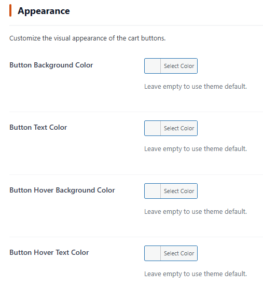
Appearance
All color fields accept a hex color value selected via the WordPress color picker. Leave any field empty to inherit your theme’s default button styles.
Button background color Sets the background color of the Save Cart and Share Cart buttons. Default: Empty (uses theme default).
Button text color Sets the text color of the Save Cart and Share Cart buttons. Default: Empty (uses theme default).
Button hover background color Sets the background color of the buttons on mouse hover/focus. Default: Empty (uses theme default).
Button hover text color Sets the text color of the buttons on mouse hover/focus. Default: Empty (uses theme default).