
Saving a cart
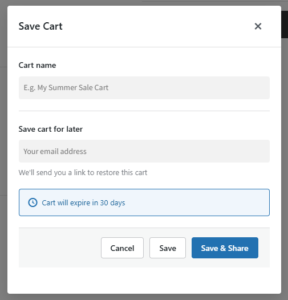
When a customer clicks Save Cart, a modal dialog appears. They enter a cart name (required by default) and, if email collection is enabled and they are not logged in, their email address. Clicking Save triggers an AJAX request that stores the cart data (all product IDs, variation IDs, quantities, and variation attributes) in the {prefix}sscwc_saved_carts table with a secure 64-character token.
The cart name is stored both in the database cart_name column and inside the JSON cart_data field under meta.cart_name. The cart hash (WooCommerce’s built-in cart hash) is also stored to help identify duplicate saves.
Sharing a cart
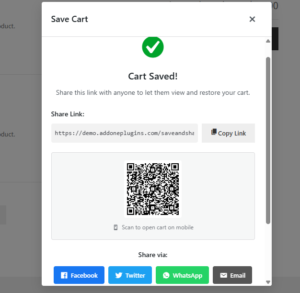
After saving, the customer sees a share dialog with:
- A copyable shareable link (e.g.,
https://yourstore.com/shared-cart/{token}/) - A Copy Link button that copies the URL to the clipboard
- A QR code image (generated by QRServer API at 200×200px by default)
- Social share buttons for Facebook, Twitter, WhatsApp, and email
The shareable URL uses a pretty permalink by default (/shared-cart/{token}/). A legacy path (/cart/share/{token}/) and a query string format (?sscwc_cart={token}) are also registered as rewrite rules.
Restoring a cart
When a shared link is visited, the plugin intercepts the request via the parse_request hook before the page is rendered. It:
- Validates the token format (alphanumeric, 32–64 characters)
- Looks up the cart in the database and checks it is active and not expired
- Clears the visitor’s current cart (this behavior is filterable via
sscwc_clear_current_cart_on_restore) - Adds each saved product back to the cart using
WC()->cart->add_to_cart() - Redirects to the cart page with a success or error notice
If any items cannot be restored (e.g., product is out of stock or deleted), a notice is shown indicating how many items were and were not restored.
My Account: Saved Carts tab
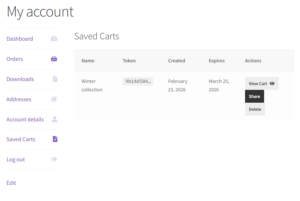
Logged-in customers have a Saved Carts tab added to their WooCommerce My Account page (/my-account/saved-carts/). This tab lists all of their active saved carts in a table showing: cart name, a truncated token, creation date, expiration date, and action buttons to View Cart, Share, or Delete. Deleting a cart from My Account marks its status as deleted in the database.
Cart blocks compatibility
The plugin is fully compatible with the WooCommerce Cart Block (block-based cart template). When the Cart Block is detected on the cart page, the Save Cart and Share Cart buttons are injected into the block’s output near the cart totals area.
HPOS compatibility
The plugin is declared compatible with WooCommerce High-Performance Order Storage (HPOS). The plugin’s custom database table ({prefix}sscwc_saved_carts) is also registered with WooCommerce’s table list for clean handling during HPOS migrations.
Automatic cleanup
A WordPress cron job (sscwc_daily_cleanup) runs once per day and marks any active carts whose expires_at date has passed as expired. Expired carts remain in the database but are excluded from all queries; they can be deleted manually from the admin panel.
QR code generation
QR codes are generated using the QRServer API (https://api.qrserver.com/v1/create-qr-code/). No API key or account is required. The default size is 200×200px. The QR provider can be changed to QuickChart via the sscwc_qr_provider filter.