
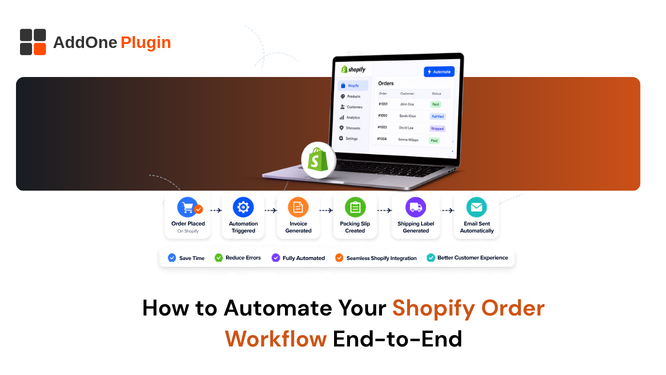
Most automation advice for Shopify stops at abandoned cart emails and inventory alerts, and skips over the part of the order lifecycle that eats the most manual hours: everything that happens between “order placed” and “books reconciled.” This guide maps the full order-to-cash workflow and where automation actually removes work, rather than just moving the same manual task to a slightly different screen. We will walk through each stage in order, then cover how Shopify Flow and a dedicated invoicing app divide the work between them without leaving gaps anyone has to cover manually.
Mapping the Order-to-Cash Workflow
The order-to-cash workflow covers every step from a customer placing an order to that revenue being recorded correctly in your accounting software: payment confirmation, fulfillment documentation, invoicing, and the accounting export at the end of the chain. Most stores automate the first step and the last step, if they automate anything at all, and leave the entire middle section entirely manual, which is exactly where the real time savings are sitting unclaimed.
Drawing this workflow out visually, even just as a simple list on paper, tends to reveal exactly where the manual steps live. Most store owners are surprised to see how many separate manual actions are actually required to get a single order from placement to a fully reconciled book entry, since each step feels small in isolation but adds up considerably across a full month of order volume, particularly during a seasonal peak when order counts spike well beyond a normal week.
Where Manual Work Usually Creeps In
The gap almost always shows up in fulfillment documentation and invoicing, the steps that require generating an actual document, not just sending an email that Shopify already handles automatically by default. Order confirmation emails are automatic out of the box, but packing slips, branded invoices, and accounting exports usually require someone to manually create or download something, order by order, day after day, without anyone ever stepping back to question why that specific step remains manual while everything around it is not.
A useful exercise is to time how long a single order actually takes to fully process from payment through to a reconciled book entry, including every manual click involved. Multiplying that number by your monthly order volume usually produces a number large enough to justify automating the gap immediately, even before accounting for the error rate that comes with any manual, repetitive process handled under time pressure.
Automating Order Confirmation and Payment
Shopify handles this part natively and well, and it is worth acknowledging that not every step in this workflow needs a third-party solution layered on top of it. The moment an order is placed and paid, an automatic confirmation email goes out with no setup required beyond your default notification templates, which is a genuinely solid foundation to build the rest of your automation on top of without needing to touch this particular step at all.
This is also a useful reminder that automation is not an all-or-nothing project. A store can leave Shopify’s native confirmation email exactly as it is while layering purpose-built automation onto the steps that genuinely need it, rather than trying to replace or duplicate something that already works well out of the box.
Automating Fulfillment Documentation
Once an order is ready to ship, someone needs to generate a packing slip so warehouse staff can verify contents match the order, and this is usually where manual work starts creeping into an otherwise automated process, particularly for stores that grew quickly enough that nobody had time to revisit this specific step.
Packing Slips, Pick Lists, and Labels
Packing slips can be automated to generate the moment an order’s status changes to fulfilled, removing the step where someone manually prints or downloads one for every shipment that goes out the door. Our packing slip customization and auto-send guide covers the setup specifically, including how to decide between triggering on order creation versus fulfillment depending on your particular warehouse workflow and whether you are packing in-house or through a third-party fulfillment partner who may have their own separate systems and expectations around timing.
Automating Invoices and Receipts
Invoicing is the step most stores still do manually, either through repeated draft orders created one at a time or by downloading and emailing PDFs individually as orders come in throughout the day, which quietly becomes someone’s part-time job without ever being formally recognized as one.
Trigger Rules for Paid, Fulfilled, and Refunded Orders
An automation rule watching for a payment, fulfillment, or refund event can generate and send the correct document, invoice, receipt, or credit note, without anyone touching the order after the rule is set up once. Our detailed guide on automating Shopify order paperwork covers invoices, packing slips, and receipts as one automated system rather than three separate ones each requiring their own manual attention and their own separate app subscription to manage independently of each other.
Setting up three separate rules rather than one combined rule per order event is usually the right approach, since it keeps each document type tied specifically to the event that makes it necessary. A refund should never trigger a new invoice, and a payment should never trigger a credit note, so keeping the logic separated by trigger type avoids a document ending up in a customer’s inbox that does not actually match what happened to their order.
Automating the Handoff to Accounting
The final and most frequently skipped step is getting invoice data out of Shopify and into your accounting software without manually re-entering anything at the end of every month, which is often where an otherwise well-automated workflow quietly falls apart under the pressure of a closing deadline.
Exporting Closed Orders to QuickBooks or Xero
Once an order is fully paid and invoiced, exporting that data to QuickBooks or Xero closes the loop on the entire workflow. Doing this automatically, rather than as a monthly manual batch export squeezed in between other tasks, keeps your books current in near real time rather than a month behind, which matters considerably if you are making any kind of financial decision based on numbers that turn out to be stale by the time you actually look at them and act on them. See our full guide to exporting Shopify invoices to QuickBooks and Xero for the setup and for choosing between the different export approaches available depending on your order volume and payment gateway mix.
This step is also where a lot of the earlier automation pays off retroactively. An invoice generated automatically, with a consistent numbering sequence and correctly captured tax details, exports cleanly with almost no manual review required. An invoice cobbled together manually under time pressure is far more likely to contain a small error that only surfaces once it reaches your accountant’s desk weeks later.
Building the Full Workflow With Shopify Flow and InvoiceForge
Shopify Flow handles workflow automation broadly, tagging customers, updating inventory, and triggering internal notifications, but it does not generate PDF documents or handle accounting exports on its own, which is a distinction worth understanding clearly before you assume Flow alone can cover this entire workflow without any additional tooling.
Where Flow Ends, and Document Automation Begins
Flow is well suited for the parts of your workflow that involve moving data or triggering internal actions, while document generation and delivery, invoices, packing slips, receipts, and accounting export need a dedicated invoicing app layered on top of whatever Flow is already handling on the operational side. Used together, Flow handles the operational triggers and InvoiceForge handles the document and accounting side, closing the full order-to-cash loop without manual handoffs at any single step along the way from placement to reconciliation. Overdue payments are the other common manual gap in this chain that tends to get overlooked entirely; our guide on automatic invoice reminders for unpaid orders covers that piece specifically, since collections is a workflow step just as much as invoicing itself is, and one that rarely gets the same automation attention.
A useful test for whether a given step in your workflow is genuinely automated is to ask what happens if everyone on your team takes a week off at the same time. If any part of the order-to-cash chain would simply stop, an order goes unfulfilled, undocumented, or unrecorded in your books, that step is not actually automated yet, regardless of what your current process might look like on a normal week when someone is there to catch it manually before it becomes visible as a problem.
It is worth mapping out your own specific workflow on paper before automating any of it, listing every step from order placement through to the moment revenue is reflected accurately in your books. Stores that skip this mapping step often end up automating the easy parts first and leaving the genuinely time-consuming steps, like fulfillment documentation and accounting reconciliation, manual indefinitely simply because nobody paused to look at the full picture at once and prioritize based on actual time cost rather than ease of implementation.
Automating one piece of the order workflow helps. Automating all of it, from payment through to your books, is what actually gets manual work off your plate for good rather than just moving it around between different tools and different people on your team. InvoiceForge handles the document generation, delivery, and accounting export pieces of that chain from a single app, working alongside whatever operational automation you already have running through Shopify Flow.