
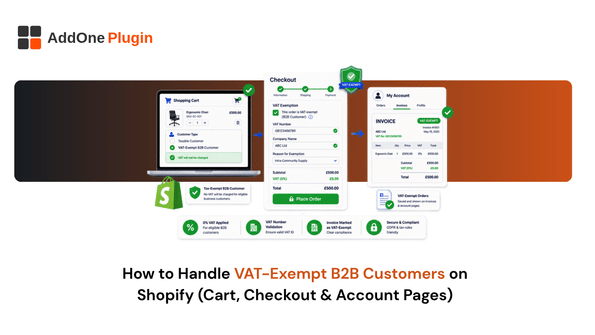
A B2B customer with a valid VAT number shouldn’t be paying VAT on a cross-border order, and when they end up charged anyway, it’s rarely because the rule is unclear. It’s because the exemption logic isn’t wired up correctly across the specific place the customer is interacting with your store, whether that’s the cart, checkout, or their account, and each of those places has slightly different rules for what Shopify can and can’t do automatically. This guide covers how VAT exemption actually works for B2B customers on Shopify, where it can be applied, and the common gaps that leave a legitimately exempt customer still seeing tax at the register.
Understanding the Two Types of VAT Exemption
Before touching any settings, it’s worth being clear that Shopify treats two different exemption scenarios differently, and mixing them up is where most configuration problems start. Getting this distinction right first saves a lot of troubleshooting later, since the two exemption types are configured in different places and fail in different ways.
Reverse Charge Exemption for Cross-Border B2B Orders
The EU and UK reverse charge exemption fully removes VAT on an order shipped to a customer in a different EU or UK country than your fulfillment location, provided the customer supplies a valid VAT number. When this applies, the customer becomes responsible for reporting and paying VAT themselves in their own country, and a note stating that the reverse charge mechanism applies gets added to the invoice automatically. Eligibility is based on where the order is fulfilled from, not your store’s registered address, which catches out merchants who assume their home country determines the rule. An order shipped from a French fulfillment center to a VAT-registered business in Ireland qualifies; the same order shipped to a business inside France does not, even though both customers might be equally VAT-registered.
Domestic “Don’t Collect Tax” Exemption for Local B2B Customers
Reverse charge only applies to genuinely cross-border transactions. A German business buying from a German warehouse is a domestic sale, and VAT applies at the local rate regardless of the customer’s B2B status, since the reverse charge mechanism specifically requires goods to move between two different countries. If you want a domestic B2B customer to also be exempt from VAT, for whatever commercial reason, that requires setting their customer profile’s tax status to “Don’t collect tax” instead, which is a separate setting from the reverse charge exemption entirely. Confusing the two is one of the most common support tickets B2B stores raise: a customer’s VAT number validates successfully, their profile shows tax-exempt, and yet checkout still charges VAT, because the domestic sale never qualified for reverse charge in the first place.
Setting Up VAT Exemption at Checkout
Checkout is where most merchants first encounter Shopify’s native VAT exemption tools, and it’s also where the biggest platform limitation currently sits, particularly for stores running a dedicated B2B storefront alongside their regular one.
Enabling the Company VAT Number Field
In your checkout settings, you can enable a Company VAT number field, letting customers enter their VAT number directly during checkout. When enabled alongside VAT invoices, a validated number automatically triggers the reverse charge exemption on eligible cross-border orders, removing VAT from the order total in real time rather than requiring a manual adjustment afterward.
The B2B Checkout Limitation Worth Knowing About
VAT number validation at checkout currently works for guest checkout and Shop Pay checkout, but isn’t available for Shopify’s dedicated B2B-specific checkout experience. If your wholesale customers are ordering through a B2B storefront rather than a standard checkout, the VAT number field and its automatic validation won’t apply the same way, which means B2B accounts often need their exemption set at the customer profile level instead of relying on checkout-time validation. This is worth confirming for your own store specifically, since which checkout experience a given customer sees can vary depending on how their account and sales channel are configured.
Displaying VAT Exemption Status in the Cart
Ideally, a B2B customer sees their exemption reflected before they even reach checkout, not as a surprise once they get there.
Why Cart-Level Visibility Matters for B2B Buyers
A wholesale buyer comparing prices across suppliers wants to see the VAT-exempt total in the cart, not discover it only after entering payment details. Showing an accurate, tax-exempt running total earlier in the journey reduces the chance a B2B customer abandons the cart, assuming from the displayed price that VAT hasn’t been accounted for correctly.
What’s Achievable with Current Shopify Tooling
Cart-level tax display generally follows the same underlying exemption logic applied at checkout, meaning a customer whose profile is already flagged as VAT-exempt, or who has previously validated a VAT number tied to their account, should see the reflected total earlier in the flow. Getting this to work reliably in the cart itself, ahead of checkout, is more dependent on theme configuration and app support than the checkout-side validation is, so testing your specific setup with a real exempt customer profile is worth doing before assuming it works store-wide.
Managing VAT Exemption from the Customer Account Level
For repeat B2B customers, setting the exemption once at the account level is far more reliable than expecting VAT number entry at every single checkout.
Setting a Customer’s Tax-Exempt Status Permanently
From a customer’s profile in your Shopify admin, you can set their tax status directly, applying either the “Don’t collect tax” exemption for domestic B2B relationships or ensuring their validated VAT number is on file for reverse charge treatment on cross-border orders. Once set, this status persists across every future order that customer places, regardless of which checkout flow they use.
Why Account-Level Setup Beats Checkout-Time Validation
Relying on VAT number entry at checkout works fine for a first-time cross-border buyer, but for an established wholesale account, it adds unnecessary friction and unnecessary risk that the exemption fails to validate on a given day due to a VIES outage. Setting exemption status directly on the account removes both problems, and it’s the more dependable route for any B2B customer you expect to order from repeatedly, since VIES availability is outside your control and a failed validation defaults to charging VAT rather than granting the exemption.
Getting the Invoice Right When Exemption Applies
None of this exemption logic matters if the invoice behind the order doesn’t reflect it correctly.
What the Invoice Needs to Show for Exempt Orders
When the reverse charge exemption applies, the invoice needs to state that the recipient is responsible for VAT, along with the customer’s validated VAT number, and it should carry no VAT line at all rather than a VAT line showing zero. For domestic “Don’t collect tax” exemptions, the invoice should similarly reflect no VAT charged, with the exemption basis clear enough that the customer’s own accounting team doesn’t need to guess why the amount differs from a standard order. An invoice that simply omits VAT without stating why can look like an error to an auditor on either side of the transaction, rather than a deliberate, compliant exemption.
How InvoiceForge Reflects Exemption Status on Generated Invoices
InvoiceForge generates the invoice from the order’s actual tax treatment, so an order that qualifies for reverse charge or domestic exemption should produce an invoice reflecting that correctly rather than a generic VAT-inclusive template. Whether InvoiceForge currently mirrors Shopify’s cart and account-level VAT number display specifically, as opposed to the underlying invoice generation, is worth confirming directly with the InvoiceForge team if that level of front-end display consistency is central to your evaluation, since it’s a more specific claim than the core invoice generation capability. For validating VAT numbers themselves before they ever reach this stage, our guide on EU VAT number validation for B2B covers the process in more depth.
Fewer Surprises at Checkout, Fewer Corrections After
VAT exemption for B2B customers isn’t one setting, it’s a chain of decisions that need to agree with each other across the cart, checkout, account profile, and final invoice. Get the distinction between reverse charge and domestic exemption right at the account level, and most of the checkout-time friction disappears on its own, since the exemption is already established before the customer ever reaches the payment page. Most of the support tickets and awkward customer conversations around VAT exemption trace back to exactly this mismatch, an exemption applied in one place but not carried through to the others, rather than any deeper misunderstanding of the tax rules themselves. For the broader mechanics of how the reverse charge interacts with the EU’s OSS scheme for your consumer-facing sales, our EU OSS VAT scheme guide covers where the B2C and B2B rules diverge, and our guide to auto-sending VAT invoices to B2B customers covers the delivery side once the invoice itself is correct.