
All color settings accept standard hex color values and use the WordPress color picker with alpha support.
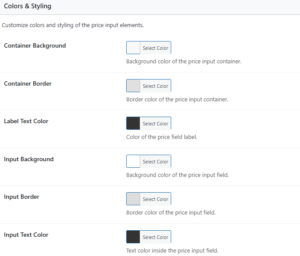
| Setting | What it controls | Default |
|---|---|---|
| Container Background | Background of the entire NYP widget area | #f9f9f9 |
| Container Border | Border around the widget container | #e0e0e0 |
| Label Text Color | Color of the field label | #333333 |
| Input Background | Background of the input field itself | #ffffff |
| Input Border | Border around the input field | #dddddd |
| Input Text Color | Color of text typed into the input | #333333 |
| Suggested Price Color | Color of the suggested price text | #666666 |
| Price Range Color | Color of the price range text | #666666 |
| Minimum Notice Color | Color of the minimum price notice | #666666 |
| Border Radius | Rounded corners in pixels for inputs and container | 4 |
Shop page settings
Shop Button Text
- Text for the button that replaces the standard “Add to cart” button on shop/archive pages for NYP products. Clicking this button takes the customer to the product page.
- Default:
Choose Price
Shop Button Background / Text / Hover colors
- Color controls for the shop page NYP button and its hover state.
Show Price Info on Shop
- When enabled, shows the suggested price and/or price range beneath each NYP product on shop and archive pages.
- Default: Off