
Pricing rules let you automatically enable Name Your Price and apply minimum, maximum, and suggested prices based on a product’s category, tag, or the current customer’s user role — without editing individual products.
Rules follow this priority order when multiple rules could apply:
Product settings > Tag rules > Category rules > Role rules > Global defaults
Each rule has the following fields:
- Type —
category,tag, orrole - Target — The specific category, tag, or role the rule applies to
- Enabled —
Yesto force NYP on,Noto force NYP off, or leave blank to not affect the enabled state - Min / Max / Suggested — Price values the rule will apply (leave blank to not override)
- Hide Regular Price — Check to hide the standard WooCommerce price when this rule is active
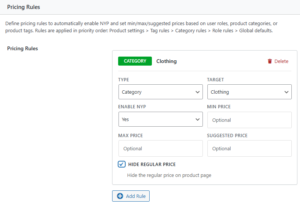
To add a rule, click Add Rule in the rules table, fill in the fields, and save settings.