
All text settings support placeholder tokens that are replaced with live values at render time.
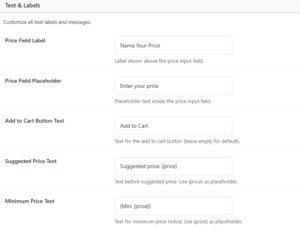
Price Field Label
- Label shown above the price input field.
- Default:
Name Your Price
Price Field Placeholder
- Placeholder text shown inside the input field when empty.
- Default:
Enter your price
Add to Cart Button Text
- Overrides the default “Add to cart” button text on NYP products. Leave empty to use the WooCommerce default.
- Default: Empty
Suggested Price Text
- Text displayed above the input when a suggested price exists. Use
{price}as a token for the formatted price. - Default:
Suggested price: {price}
Minimum Price Text
- Text shown next to the label as a minimum notice. Use
{price}as a token. - Default:
(Min: {price})
Price Range Text
- Text shown below the input when both minimum and maximum prices are set. Use
{min_price}and{max_price}as tokens. - Default:
Price range: {min_price} - {max_price}