
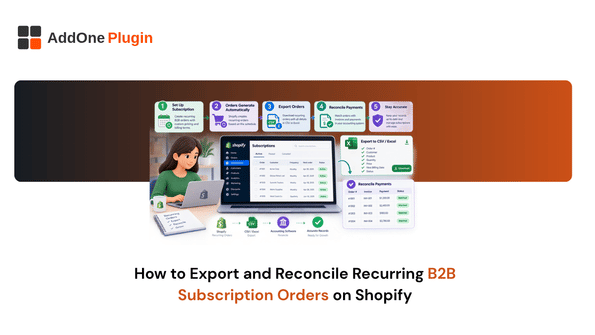
Reconciling one-time orders against your books is straightforward. Recurring B2B subscription orders are a different problem entirely, because a single customer can generate dozens of charges over a year, each one needing to match up against the right invoice and payout. This guide covers what actually makes recurring order reconciliation hard, and how to export the right data to make your monthly close painless.
Why Recurring B2B Orders Are Harder to Reconcile Than One-Time Sales
A one-time order has one charge, one payout, and one line in your books. A recurring order multiplies that by however many billing cycles have run, and each one needs to be tracked individually.
Multiple billing cycles per customer
A single wholesale customer on a monthly recurring order might generate twelve separate charges a year, each with its own order ID, payout timing, and potential for a failed or retried payment. Losing track of even one of those cycles creates a gap in your books that’s hard to trace back later.
Mismatched order dates vs. payout dates
The date an order is created rarely matches the date the payout actually lands in your bank account, and that gap widens further when a charge fails and retries days later. If your reconciliation process assumes those two dates are the same, discrepancies will keep showing up every month.
What You Need to Export for a Clean Reconciliation
Before you can reconcile anything, you need the right data pulled out of Shopify in a format that actually lines up with your accounting records.
Order-level data vs. payout-level data
Order-level data tells you what was sold and to whom. Payout-level data tells you what actually landed in your bank account and when. You need both, and you need a way to connect them, since Shopify treats these as separate exports by default.
Matching subscription charges to specific invoices
Every recurring charge should trace back to a specific invoice with a specific due date and amount. If your invoicing process isn’t generating a distinct record per billing cycle, reconciliation turns into guesswork by the third or fourth month. Our guide on automated recurring invoices for Shopify subscription orders covers how to keep that invoice-per-cycle record consistent in the first place.
How Do You Export Recurring Orders From Shopify?
Shopify’s native order export is built around a general CSV pull rather than a subscription-aware report, which creates extra manual filtering for recurring orders specifically.
Native export limitations
The standard order export includes every order type mixed together, with no built-in flag separating a first-time subscription charge from a recurring renewal. You end up filtering manually by tag or order note to isolate what you actually need.
Filtering by subscription/recurring order tags
If your subscription or recurring order setup applies consistent tags, filtering the export by those tags before reconciling narrows things down considerably. This only works if the tagging was applied consistently from the start, which is worth double-checking before you rely on it for a full reconciliation pass.
Reconciling Against Your Books
With the right export in hand, the actual reconciliation comes down to a consistent, repeatable check every period.
Common mismatches to check for
Watch for orders that were created but never invoiced, invoices that were sent but never paid, and payouts that don’t match the expected order total once fees are subtracted. Each of these points to a specific breakdown in the chain between order and cash.
A repeatable monthly close checklist
Export recurring orders and payouts for the period, match each recurring order to its invoice, flag anything without a matching payout, and confirm fees and refunds are accounted for separately rather than folded into the order total.
Automating the Export Step
Manually filtering and cross-referencing exports every month is exactly the kind of repetitive task worth automating once your recurring order volume grows past a handful of customers.
Unified exports across recurring and one-time orders with SubsExport
SubsExport is built to pull recurring and one-time orders into a single, consistent export, rather than requiring you to manually separate and tag them yourself every billing cycle. That’s the piece that turns a multi-hour monthly reconciliation task into something closer to a five-minute review.
Reconciling recurring B2B subscription orders comes down to one thing: making sure every charge has a clear path back to an invoice and a payout, every single cycle. The manual version of this works at low volume, but it gets slower and less reliable as your recurring customer base grows. If your monthly close is still built on manually filtered exports, SubsExport is built to remove that step entirely.