
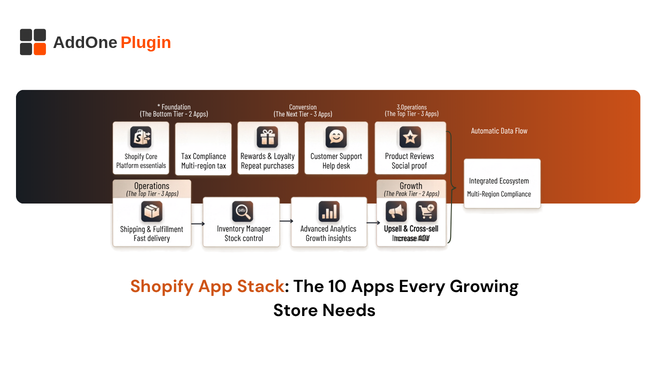
Most Shopify app stack roundups are marketing checklists for conversion and email tools, and quietly skip an entire category that every store eventually needs: the paperwork behind the order. Here is a 10-app stack built by category, including the one most lists leave out entirely, along with a practical framework for deciding what to add and when, rather than just a list of app names with no reasoning attached.
How to Think About Your App Stack, Not Just Your App List
A good app stack is not a list of individually impressive apps, it is a set of categories that together cover the full customer journey, from first visit through repeat purchase and the operational work behind every order that a customer never actually sees. Adding apps without mapping them to a category first is how stores end up with fifteen overlapping tools and a slower storefront, each one solving a fragment of a problem that a smaller, more deliberate stack would have covered more cleanly.
The Categories That Move Revenue vs. Operations
Some categories directly influence revenue: conversion, email and SMS, upsells. Others quietly protect the business and keep it running smoothly without showing up on a revenue dashboard: shipping, returns, and order documentation. Both matter, but it is easy to over-invest in the first group and completely ignore the second until something breaks in a way that is far more expensive to fix reactively than it would have been to prevent.
A useful way to audit your current stack is to sort every installed app into one of these two buckets, revenue-facing or operations-facing, and then check whether the operations bucket has any real gaps. Stores that have never done this exercise are often surprised by how lopsided their stack actually is once it is laid out this way.
Conversion and Marketing Apps
Reviews and social proof reduce purchase hesitation, and a strong email and SMS program remains one of the highest-ROI marketing channels available to any store, since it is the one channel you fully own regardless of algorithm changes on other platforms that are entirely outside your control. Post-purchase upsell tools add incremental revenue per order without requiring new traffic, which makes them one of the more efficient additions to a stack that is already driving decent volume through the front door.
Stores often over-index on this category simply because results here are the most visible and the easiest to attribute directly to revenue on a dashboard. That visibility is exactly why operations-side gaps tend to go unnoticed for far longer, since a missing invoicing setup does not show up as a lost sale, it shows up as slow, quiet erosion of trust with buyers who never say anything and simply do not come back.
Operations Apps
Shipping and returns apps keep fulfillment moving and reduce the support burden that comes from customers asking where their order is, a question that becomes considerably more frequent as order volume grows without a corresponding investment in tracking visibility. Inventory management tools prevent overselling, which is one of the fastest ways to damage trust with a repeat customer who was promised something that turned out not to actually be in stock.
Returns management in particular deserves more attention than it usually gets in a typical stack. A clunky returns process does not just cost you the returned sale, it shapes whether that customer buys from you again at all, since a frustrating return experience is one of the more memorable negative touchpoints a customer can have with a brand.
The Category Most Lists Skip: Invoicing and Paperwork
Almost every “essential Shopify apps” article covers marketing, conversion, and shipping, then stops. Invoicing, packing slips, and receipts rarely make the list, despite being paperwork every single order generates regardless of store size, store category, or how sophisticated the rest of the stack already is.
Why Documentation Is Part of the Stack, Not an Afterthought
A branded, automated invoice is a trust signal the same way a polished checkout page is, and for B2B and wholesale stores it is not optional at all, since buyers’ finance teams expect a compliant document for every purchase before they will even process payment. InvoiceForge fills this slot in the stack, automating invoices, packing slips, receipts, credit notes, quotes, and proforma invoices from one app rather than requiring three separate tools to cover the full document lifecycle each with their own subscription cost. Our guide to automating Shopify order paperwork covers the setup in full, including how to combine multiple document types into a single automation flow rather than managing them separately.
Analytics and Attribution Apps
Shopify’s built-in analytics cover the basics, but growing stores need to know where revenue is actually coming from, not just that it happened after the fact. Multi-touch attribution and profit-level analytics, accounting for cost of goods, shipping, and ad spend rather than just top-line revenue, are what separate genuinely knowing which channels work from guessing based on last-click data that tells an incomplete story.
Building Your Stack by Store Stage
The right number and mix of apps depends heavily on where your store currently sits in terms of order volume and revenue, and a stack that made sense at launch often needs deliberate revisiting as the business matures past its early stage.
What to Add at $0-$10K, $10K-$50K, and Beyond
At the earliest stage, focus on a lean stack: reviews, basic email, and automated invoicing, since manual paperwork is already a burden even at low volume and only gets heavier from here without early intervention. Between $10K and $50K, layer in upsell tools, deeper attribution, and a dedicated accounting export from your invoicing app as order volume makes manual reconciliation genuinely impractical rather than merely inconvenient. Past that stage, the priority shifts to making sure each existing app is still earning its place, since a bloated stack slows down both your storefront’s load times and your team’s ability to actually use the tools they are paying for effectively. Our full feature comparison of invoice apps can help you evaluate whether your current invoicing setup still fits as you scale into higher order volume and more complex B2B or wholesale requirements.
It is worth scheduling a recurring stack review, even just once or twice a year, specifically to ask whether each app is still solving the problem it was originally installed to solve. Apps rarely get removed once installed, even after they stop earning their keep, simply because nobody revisits the decision unless something forces the question, and a small annual audit tends to surface real, recoverable subscription costs sitting unused.
A Practical Checklist Before You Add Anything New
Before installing a new app into any category, it is worth running through a short checklist: does this genuinely fill a gap nothing else in your stack currently covers, does it add meaningful load time to your storefront, and does it require ongoing manual management or does it run on its own once configured. An app that fails the last test quietly becomes another manual task disguised as automation, which defeats the purpose of adding it to the stack in the first place.
A strong app stack is not about installing the most tools, it is about making sure every category that actually needs coverage has it, including the one behind every single order that customers rarely think about until it goes wrong. InvoiceForge is worth adding to round out the operations side of your stack, closing a gap that most roundups never mention in the first place despite how consistently it shows up once a store starts scaling past its earliest days.