
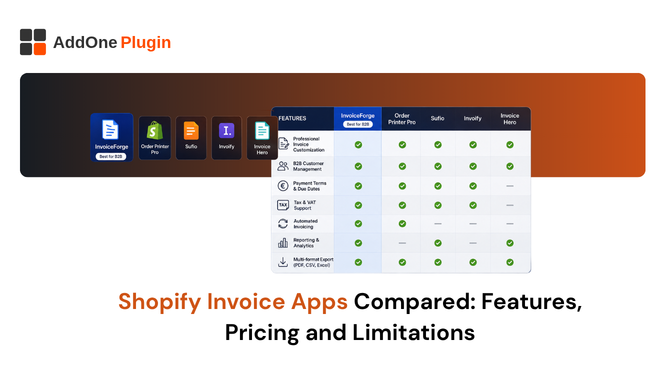
Most “best invoice apps” roundups are written by the apps themselves, which is a problem when you are trying to figure out what actually breaks once you hit real order volume. This comparison focuses on the distinction that matters most, features versus limitations, so you can see where each app runs out of road.
Order Printer Apps vs. Dedicated Invoicing Apps
These two categories get lumped together constantly, but they solve different problems. An order printer app pulls the latest order data every time you generate a document, which means the document can change if the order changes later. A dedicated invoicing app creates a fixed, permanent document at the moment it is generated.
Why the Distinction Matters for Compliance
If a customer requests a refund after their invoice was already sent, an order printer app might regenerate a document that no longer matches what was originally issued. A dedicated invoicing app keeps the original invoice untouched and creates a separate credit note instead, which is what most tax authorities expect to see. Our guide on handling invoice disputes and corrections covers this distinction in more depth.
Feature Comparison Table
| Feature | Order Printer Apps | Dedicated Invoicing Apps |
| Document permanence | Regenerates from live order data | Fixed at time of creation |
| Document types | Usually invoices and packing slips | Invoices, credit notes, receipts, quotes, proformas |
| Automation | Often requires manual download-link setup | True trigger-based automation |
| Template editing | Liquid/HTML code | Drag-and-drop, no code required |
| Accounting export | Rarely included | Often built in |
Document Types Supported
The number of document types matters more than it looks on paper. A store that needs invoices, packing slips, and credit notes but only has an invoice-only app ends up paying for two or three separate subscriptions to cover the full order lifecycle.
Automation and Delivery
Some apps marketed as “automatic” actually require you to manually insert a download link into your Shopify notification emails, which only generates a document when the customer clicks it. True automation generates and delivers the document the moment an order hits a status like paid, fulfilled, or refunded, with no manual click required from anyone.
Pricing Breakdown by App
Free plans across this category typically cap you on order volume, document types, or watermark removal, and the real cost only becomes clear once you hit those limits.
Free Plans and Their Real Limits
Some apps cap free plans at a low number of monthly PDF downloads, others restrict the free tier to a single document type, and a few gate basic customization like removing a watermark or adding custom fonts behind a paid plan. InvoiceForge’s free plan includes all six document types with no watermark, with accounting exports reserved for the Starter paid tier.
What Triggers a Plan Upgrade
Order volume is the most common trigger, but so is needing a second document type, wanting to remove branding from a free-tier watermark, or needing an accounting export. Know which of these you are likely to need in the next six months before committing to a “free forever” plan that is free in name only.
Where Each App Falls Short
No app is perfect for every use case, and being upfront about limitations is more useful than a glowing five-star review.
Order Printer Pro’s Limitations
Order Printer Pro is a capable, popular tool for merchants comfortable editing Liquid templates, but its automation model relies on inserting download links into notification emails rather than true trigger-based delivery, and it has limited native B2B document support like proforma invoices and credit notes. For a head-to-head, see Order Printer Pro vs. InvoiceForge.
Sufio’s Limitations
Sufio is strong on compliance and international tax support, but pricing scales quickly with document volume, and everything is managed through Sufio’s own external dashboard rather than directly inside Shopify admin. See our existing comparison, InvoiceForge vs. Sufio, for a full breakdown. Vify’s Order Printer app is a similar case, strong on multi-currency templates but with a thinner B2B document set; see InvoiceForge vs. Vify for that comparison.
Where InvoiceForge Fits
InvoiceForge was built around the idea that breadth of document types should not be a paid feature, while the things that actually cost money to build and maintain, like accounting integrations, are reserved for paying customers.
Six Document Types on the Free Plan
Invoices, packing slips, receipts, credit notes, quotes, and proforma invoices are all available on InvoiceForge’s free plan, with the drag-and-drop template editor included at every tier.
What’s Locked to the Starter Plan
The QuickBooks, Xero, and CSV accounting export lives on the Starter plan, since that is the feature that saves the most time once your order volume justifies the upgrade.
The honest answer to “which invoice app is best” depends entirely on what breaks for your specific store. Compare InvoiceForge’s free plan against whatever you are using today and see where the limitations actually show up.