
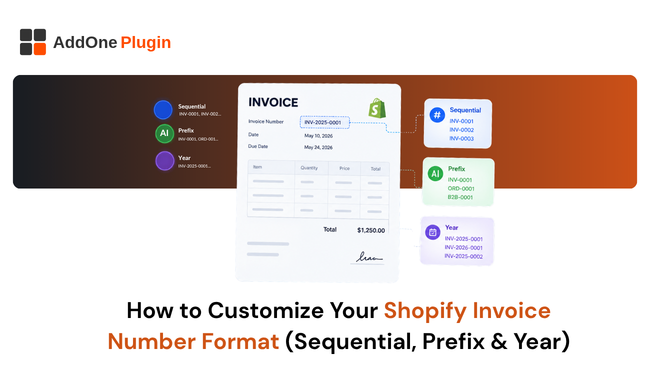
Shopify does not assign invoice numbers. It assigns order numbers, and many merchants use the two interchangeably without realizing that tax authorities in several major markets have specific rules about how invoice numbers must behave over time. This guide covers what those rules actually are, why they exist, and how to set up a compliant numbering format before it becomes a real problem during an audit rather than something you can fix retroactively without consequence.
Order Number vs. Invoice Number
A Shopify order number is an internal reference starting at 1001 and incrementing with every single order placed, including cancelled orders, test orders, and abandoned checkouts that never actually completed. An invoice number is a genuinely separate, purpose-built sequence tied specifically to billing documents, and the two are not required to match each other at all, despite how often they get treated as interchangeable in practice by stores that have never had a reason to separate them until a specific buyer or tax authority asks a pointed question.
Why Shopify Doesn’t Assign Invoice Numbers Natively
Shopify’s order numbering exists purely to track orders through fulfillment internally, not to satisfy formal tax invoicing rules that vary by jurisdiction. Since invoice numbering requirements differ significantly by country, and Shopify serves merchants across every market simultaneously from one shared codebase, native order numbers were genuinely never designed with the intention of doubling as compliant invoice numbers for any specific tax regime. Building that level of jurisdiction-specific logic into core order numbering would add complexity most merchants do not need, which is why the responsibility is left to specialized apps built specifically for this purpose instead.
This design decision makes sense from Shopify’s perspective as a global platform, but it does mean the responsibility for compliant invoice numbering shifts entirely onto the merchant, and specifically onto whichever app or manual process is generating the actual billing documents rather than the underlying order records.
Native Options: Prefix and Suffix
Shopify’s admin does let you customize the format of your order number to a limited degree, which covers some basic branding needs but not much beyond that, and it is worth understanding exactly where this native option stops being useful.
Setting a Global Prefix in Shopify Admin
From Settings, then General, you can add a prefix or suffix to your order ID format, for example turning the plain #1001 into something like SDA-1001 for basic brand identification purposes. This is a genuinely quick change to make and gives your order numbers a bit more identity. Still, it does not create a separate invoice sequence distinct from your order numbering. It applies retroactively to how existing order numbers display, not just new ones going forward, which is worth knowing before you assume changing it only affects future orders.
The Native Limitation: One Sequence for Everything
The prefix and suffix setting applies uniformly to every single order across your entire store without exception. There is no native way to run a separate sequence specifically for B2B orders versus retail orders, and no way to reset a sequence at the start of a new fiscal year without that change also affecting your underlying order numbers, which most stores do not want to touch just to satisfy an invoicing requirement that has nothing to do with fulfillment tracking in the first place.
This single-sequence limitation becomes a real practical problem the moment a store wants to report B2B and retail revenue separately at a glance. Without a distinct invoice number range for each, the only way to separate the two after the fact is filtering by order tags or customer type, an extra step that a properly separated numbering sequence would have avoided entirely. It also becomes a problem the moment you bring on a bookkeeper or accountant who is used to working with a clean, purpose-built invoice register, since reconciling a mixed sequence against Shopify’s own order data takes considerably more of their time, which often shows up as a higher bill from them at the end of the month.
Why Sequential Numbering Matters for Compliance
This is genuinely not just an organizational preference or a nice-to-have detail. Several jurisdictions have specific legal requirements around exactly how invoice numbers must behave, and getting this wrong can create real problems well beyond a cosmetic inconsistency in your records.
The EU VAT Zero-Gap Rule
The EU VAT Directive requires invoice numbers to be sequential with absolutely no gaps in the sequence. If your numbering skips a number, for example because an order was cancelled before an invoice was ever generated for it, that visible gap can trigger genuine questions during a tax audit, since auditors are specifically trained to look for exactly this kind of discontinuity as a potential red flag for undeclared revenue that was never properly invoiced. Our Shopify VAT invoice guide for the UK, EU, and Australia covers the full compliance picture broken down by specific market, since the exact rules differ meaningfully between jurisdictions even within Europe, and assuming one country’s rule applies everywhere is a common and avoidable mistake that catches out a lot of merchants expanding into new markets.
What Happens When an Order Is Cancelled
If your invoice numbering is tied directly to Shopify’s order number and a given order is cancelled before it ever generates a document, that number simply never appears anywhere in your invoice records, creating a visible, unexplained gap. A genuinely separate invoice-only sequence avoids this problem entirely, since invoice numbers under that system are only ever assigned at the moment a document is actually created, not at the moment an order is merely placed, regardless of whether that order later gets cancelled or refunded in full before an invoice was ever needed.
This distinction becomes especially important for stores with a meaningful cancellation or abandoned-checkout rate, since every one of those non-completed orders would otherwise show up as a missing invoice number if the two sequences were tied together, forcing you to explain a growing list of gaps rather than a clean, continuous invoice record.
Setting Up a Custom Numbering Sequence
The fix here is to decouple your invoice numbering from your Shopify order number entirely, using a dedicated invoicing app that maintains its own independent sequence rather than borrowing Shopify’s fulfillment-oriented numbering system.
Separate Sequences for B2B and Retail
Many stores want their B2B invoices numbered differently from retail invoices, for example using a distinct prefix like B2B-0001 versus RTL-0001, so accounting teams can separate revenue streams at a glance without needing to cross-reference order tags or filter through mixed data every time a report is pulled together for a board meeting or a lender review. InvoiceForge supports independent numbering sequences per document type, so you can set this up once during initial configuration and genuinely stop thinking about it afterward. Our wholesale invoicing setup guide covers exactly how this fits into a broader B2B document workflow alongside PO numbers and net terms that also need to stay consistent across a growing number of wholesale accounts as your business scales.
Resetting a Sequence Without Breaking Your Audit Trail
If you genuinely need to reset your numbering, for example at the start of a new fiscal year or following a rebrand, export a complete record of every single invoice issued under the old sequence first, before making any changes, then clearly document the exact date the new sequence officially starts. Never simply overwrite the old numbers or delete the historical record, since doing so breaks the audit trail a tax authority would reasonably expect to find fully intact if they ever come asking questions about a specific period, even one that predates the reset by several years.
It is worth building a simple internal note, even just a dated entry in a shared document your team can reference, recording exactly when and why a numbering sequence changed, so that anyone reviewing your books years later, including a future accountant who was not part of the original decision, can understand the history without having to guess or reconstruct it from scattered evidence across old emails and spreadsheets that may not even still be accessible by then.
Choosing a Format That Scales
The format you choose today should genuinely still make sense once you are processing ten times your current order volume, not just at your current scale where the difference between formats feels mostly cosmetic and easy to change later without consequence.
Year-Based vs. Pure Sequential Formats
A year-based format like 2026-0001 resets annually and makes it genuinely easy to spot which fiscal year a given invoice belongs to at a glance, which many accountants and bookkeepers actively prefer for exactly this reason, since it removes a lookup step during year-end close when they are cross-referencing invoices against a specific reporting period. A pure sequential format like INV-000001 never resets at all and is simpler to implement from a technical standpoint, but makes year-over-year filtering slightly more difficult without additional tagging or metadata layered on top of the base numbering system.
Either approach works perfectly fine for compliance purposes as long as the underlying sequence itself has genuinely no gaps in it whatsoever, since the zero-gap rule cares about continuity within the sequence, not which specific format you land on choosing. Some stores land on a hybrid, a year prefix combined with a sequence that never fully resets, which gives them the readability of a year-based system without losing a single continuous count across the life of the business.
Whichever format you land on, document the reasoning behind the choice somewhere accessible to your whole team, since a numbering scheme that made intuitive sense to whoever set it up originally can look arbitrary to someone else looking at it two years later without that context available to them at the time they need it most.
Invoice numbering is exactly the kind of detail that is easy to fix correctly at low volume and genuinely painful to fix once you already have thousands of invoices sitting under the wrong format. InvoiceForge lets you set a fully compliant numbering sequence, independent from your Shopify order number, before it grows into a considerably bigger problem down the line.