
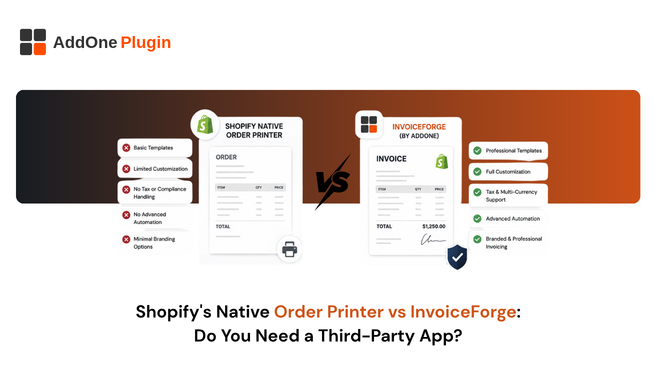
Shopify’s free Order Printer app can print an invoice in a pinch, but “can print an invoice” and “issues a compliant, professional invoice” are two different things. If you are trying to decide whether the native Order Printer app covers your needs or whether it is time for a dedicated invoicing app, this guide breaks down exactly where the free tool stops, and where a compliance-focused app like InvoiceForge picks up.
What Shopify’s Native Order Printer App Actually Does
Order Printer is built into every Shopify store at no cost, and for basic paperwork needs, it genuinely does the job. It is worth understanding exactly what that job is before deciding whether you need more.
Free bulk printing basics
You can select orders from your admin and print invoices, packing slips, or receipts in a batch, using a template that comes ready to go out of the box. The template is editable through Liquid, HTML, and CSS if you or a developer want to customize the layout, add fields, or adjust branding.
The 50-order cap and browser-print limitations
Order Printer caps bulk actions at 50 orders at a time, and printing runs through your browser’s native print dialog rather than generating a true server-side PDF. That means formatting can shift depending on whether the document was saved from Chrome, Safari, or Firefox, and filenames follow Shopify’s default naming pattern with no way to customize them through the app itself. For a store printing a handful of orders a week, this is a minor inconvenience. For a store printing hundreds, it becomes a genuine bottleneck.
No VAT/GST compliance features
The native template has no built-in support for sequential invoice numbering, VAT number capture, or reverse-charge notation. Any of that has to be added manually through code, and none of it updates automatically as tax rules or your business details change. If your VAT number changes, or a new country’s requirements kick in, you are responsible for finding and updating every relevant line of template code yourself.
This is where the free app quietly stops being free. The app itself costs nothing, but the developer time to add and maintain compliance fields, and the risk of getting one of them wrong, is a real ongoing cost that does not show up on a pricing page.
Where Native Order Printer Falls Short for B2B and Compliance
For a low-volume, domestic B2C store, these gaps rarely matter in practice. For a B2B or cross-border seller, they compound quickly and start showing up in ways that affect real customers.
No independent invoice numbering
Because Order Printer generates documents from live order data on demand, there is no persistent, sequential invoice number tied to the document itself. Many tax authorities require exactly that: a gapless, sequential numbering scheme that proves nothing has been altered or skipped after the fact. Shopify’s order number is not a substitute, since it is tied to the order record rather than the invoice document, and it does not behave the same way under an audit.
No automated delivery or reminders
Every invoice has to be manually printed or exported and sent to the customer. There is no built-in way to automatically email an invoice the moment an order is placed, and no way to automatically chase an unpaid B2B invoice with a reminder sequence. That work falls entirely on your team, order by order.
No VAT number capture or validation
If you sell B2B into the EU or UK, you need a reliable way to capture and display your customer’s VAT number on the invoice itself, particularly where the reverse charge mechanism applies. Order Printer has no field for this out of the box, which means you are either building one manually in code or leaving a compliance gap open.
Each of these three gaps is manageable on its own. Together, they describe a tool that was designed to print a document, not to issue one that a tax authority or a wholesale customer’s accounts payable team would treat as a valid financial record. That distinction rarely matters until the first time it does, usually when a B2B customer’s finance team rejects an invoice for missing a required field.
When Is the Free Order Printer App Enough?
The native Order Printer app is enough if you run a low-volume, B2C-only store with no VAT/GST invoicing obligations and no need for automated delivery. Once any one of those conditions changes, the gaps above start costing real time, and eventually real compliance risk.
Low order volume, B2C-only stores
If you are shipping domestically to consumers and your only documentation need is an occasional printed invoice or packing slip, the free app covers that use case well, and there is little reason to pay for more.
No VAT/GST invoicing requirement
If your business is not VAT or GST registered, or you are not legally required to issue formal tax invoices for the sales you make, the compliance gaps in Order Printer are largely irrelevant to your situation, at least for now.
What InvoiceForge Adds Beyond the Native App
The difference shows up fastest for stores that have already tried working around Order Printer’s limits with manual template edits or a patchwork of browser workarounds. What a compliance-first app changes is not the printing itself; it is removing the printing step from the process entirely.
Automatic VAT/GST-compliant invoices
InvoiceForge generates a compliant invoice automatically on order, payment, or fulfillment, with the fields your tax authority requires already built into the default template. There is no code to write and no field to remember to add manually.
Sequential invoice numbering and credit notes
Every invoice gets a persistent, sequential number that holds up under audit, and refunds generate a proper credit note rather than a modified copy of the original invoice with the total simply changed.
Branded, automated delivery
Invoices go out automatically, styled with your logo and colors, without anyone touching a print dialog or manually attaching a file to an email. The full feature set behind this automation covers how the triggers and delivery rules work in more detail.
Together, these three pieces, automatic generation, persistent numbering, and automated delivery, cover the exact gaps the free native app leaves open. None of them require a developer to set up, which matters most for the stores that were avoiding a paid app specifically to avoid a development project.
Choosing Between Free and Compliant
A quick decision checklist
- Do you sell B2B or cross-border and need VAT/GST-compliant documents? If yes, the native app will not fully cover you on its own.
- Do you need invoices to be sent automatically rather than be printed manually, order by order? If yes, you need a dedicated app built around automation.
- Is your order volume regularly above 50 orders in a single batch? If yes, the native cap will actively slow your team down.
- Do you need a sequential, gapless invoice number for compliance purposes? If yes, the native app cannot provide that on its own.
Next steps
If none of those apply to your store today, Order Printer is a perfectly reasonable starting point, and there is no need to add complexity you do not yet need. See the full InvoiceForge feature set if you want a closer look at what changes once you do need more. If your store already sells B2B or cross-border, moving to a dedicated tool now is cheaper, in time and risk, than retrofitting compliance onto a manual process later.
Free tools are free right up until the moment they cost you a failed audit or a B2B customer who is still waiting on a proper invoice three days after their order shipped. Match the tool to what your store actually needs to send, not to what came installed by default.
It is also worth being honest about the direction most growing stores move in. A store that starts B2C-only and stays that way rarely outgrows Order Printer. A store that adds even a handful of wholesale accounts, or starts shipping into a new VAT jurisdiction, tends to hit these gaps within months rather than years. If either of those is even a plausible direction for your business over the next year, it is worth setting up compliant invoicing before the gap becomes urgent rather than after. For a closer look at how InvoiceForge stacks up against a paid order-printer competitor rather than the free native app, see InvoiceForge vs Order Printer Pro.