
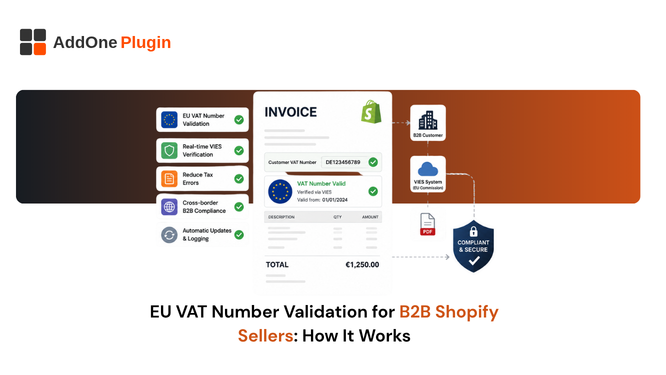
Getting a customer’s VAT number wrong, or skipping validation entirely, does not just create messy books. It can mean charging VAT you should not have, or worse, failing to charge VAT you were legally required to collect, with the liability landing on you rather than the customer. Here is how EU VAT number validation actually works on Shopify in 2026, what Shopify’s native checkout feature does and does not cover, and why validation at checkout is not the same thing as compliance on the invoice.
Why VAT Number Validation Matters for B2B Sales
When a VAT-registered EU business buys from another VAT-registered EU business across a border, VAT is often not charged at the point of sale, but only under specific, verifiable conditions.
Skipping this step entirely, or treating it as optional paperwork, is one of the more common ways B2B Shopify sellers end up with an unpleasant surprise at tax time. The rules exist precisely because the reverse charge mechanism shifts real money and real reporting obligations, and a tax authority will not simply take your word for it that a customer’s number was legitimate.
The reverse charge mechanism explained
Under the reverse charge mechanism, the seller does not charge VAT; instead, the buyer self-accounts for it on their own VAT return in their home country. For this to be legally valid, the seller needs to confirm the buyer’s VAT number is real and currently active, not simply record whatever number the buyer typed into a form.
The risk of skipping validation
Accepting an invalid or fabricated VAT number without checking it can leave you personally liable for VAT you should have charged at the point of sale, plus penalties and interest on top. Tax authorities expect sellers to have actively validated the number at the time of sale, not simply to have recorded one in good faith.
This risk is not hypothetical or rare. VAT numbers get mistyped, entered in the wrong format, or occasionally provided by a customer trying to avoid a charge they are not actually entitled to avoid. A validation step at the point of sale catches nearly all of these before they become your problem months later.
How Shopify’s Native VAT Validation Works
As of February 2026, Shopify Tax merchants selling in the EU or UK can enable native VAT number validation at checkout, which automatically applies the reverse charge exemption when a valid number is entered.
What it covers at checkout
The Company VAT number field validates in real time against the EU’s VIES system, the official database tax authorities use to confirm registered VAT numbers. When the number comes back valid, VAT is removed from the order automatically and the reverse charge exemption applies without any manual intervention from your team.
Which merchants it’s limited to
This feature is only available to merchants using Shopify Tax, and specifically to those with at least one fulfillment location inside the EU. Merchants using a third-party tax app, or without an EU fulfillment location at all, do not have access to this native checkout feature and need a different validation path.
If that describes your store, do not assume you are simply exempt from the validation requirement itself. The legal obligation to validate a customer’s VAT number before applying the reverse charge exemption still applies; you just need to handle it manually or through a third-party app rather than relying on Shopify’s built-in checkout field.
What it doesn’t do for your invoices
Checkout validation confirms the number was valid at the time of purchase and removes VAT from the order total. It does not, on its own, guarantee that the VAT number, and the required reverse-charge note explaining why VAT was not charged, actually appear correctly formatted on the invoice document your customer ultimately receives and keeps for their own records.
This gap between “checkout data” and “invoice document” is easy to overlook because it never shows up as an obvious error. The order looks correct in your admin, the customer paid the right amount, and everything appears fine until an auditor, or the customer’s own accounts payable team, asks to see the VAT number printed on the invoice itself.
What Happens If a Customer’s VAT Number Is Invalid?
If a VAT number fails validation at checkout, the reverse charge exemption does not apply, and standard VAT is charged on the order instead; there is no manual override available to force the exemption through regardless of circumstances.
VIES fallback checks
If the VIES service is temporarily unavailable, and it does experience occasional downtime, validation cannot complete at all, and Shopify may apply rate limits after repeated failed attempts from the same customer. Both of these are worth knowing about in advance so a broken checkout does not get mistaken for a genuinely invalid customer.
It is worth checking VIES status directly if you get an unusual spike in failed validations on a given day, rather than assuming the problem sits with your customers. A quick look at the European Commission’s own status page settles the question in under a minute.
Handling failed validation at checkout
Merchants sometimes see customers retry with a differently formatted version of the same number, or reach out to support directly when validation fails unexpectedly. Having a clear internal process for manually confirming a VAT number through VIES yourself, outside of the checkout flow, is worth building as a backup rather than leaving the customer stuck.
A short, clear message at checkout explaining what to do if validation fails, try again in a moment, or contact us directly, reduces abandoned carts from legitimate B2B customers who assume something is broken on your end rather than a temporary VIES outage.
Making Sure Your Invoicing Closes the Gap
Whatever tool generates your invoices, the test is the same one an auditor or a customer’s accounts payable team will apply: does the VAT number that was validated at checkout actually show up, correctly formatted with the right reverse-charge note, on the document your customer keeps for their own records.
Auditing your current setup
Pull a handful of recent B2B invoices from orders where the reverse charge exemption applied, and check them directly rather than assuming the field carried through. If the VAT number and the reverse-charge note are both present and correctly worded, you are covered. If either is missing, that is a gap worth closing before it surfaces during an audit rather than after.
What to ask your invoicing provider
Before relying on any app for this specific requirement, ask directly whether it pulls the customer’s VAT number from checkout or company data and displays it, along with the reverse-charge note, on the generated invoice itself, not just in your order admin. A confirmed yes here is worth more than a general claim of “VAT compliant” on a pricing page.
Multi-country consistency
If you sell into several EU countries, confirm this works the same way across all of them, since reverse-charge wording requirements can vary slightly by jurisdiction even when the underlying mechanism is the same.
Building a Fully Compliant Checkout-to-Invoice Flow
Checklist
- Confirm whether Shopify’s native VAT validation applies to your setup: Shopify Tax, plus at least one EU fulfillment location.
- Build a manual VIES-check process as a backup for the edge cases native validation cannot cover.
- Verify that validated VAT numbers actually appear on the invoice document your customer receives, not just in your internal checkout data.
- Review your reverse-charge note wording against your tax advisor’s guidance, since the exact phrasing required can vary slightly by jurisdiction.
- Spot-check a sample of recent B2B invoices now, rather than assuming validation and invoicing are already working together correctly.
Next steps
Our full VAT invoice requirements guide for UK, EU, and Australia and how to auto-send VAT invoices to B2B customers both cover what needs to happen structurally after validation succeeds at checkout. For the definitional basics of what a VAT invoice needs to contain in the first place, see what is a VAT invoice, and do you need one on Shopify.
Validating a VAT number at checkout is only half the job. The number, and the reverse-charge note it triggers, need to make it onto the actual invoice your customer keeps for their own tax records, not just live quietly in your Shopify order data where nobody outside your team will ever see it.